
The Anatomy of a Destructive Attack
The first call comes early in the morning. A remote employee cannot access their laptop. Soon after, core business applications are offline. By the time IT teams reach the office, the scale of the damage is clear. Thousands of endpoint devices have been wiped simultaneously. There is no ransom note, backups are unavailable and the help desk is overwhelmed with calls from staff whose machines will not start. Losses are already mounting, while customers and suppliers are unable to access systems or information.
This is a destructive cyberattack. Unlike financially motivated ransomware, which typically holds data hostage for payment, a destructive attack is designed to render systems and data unusable. The attacker’s objective is to damage systems or disrupt normal operations, not to provide a recovery path.
The cost of destructive attacks
The scenario above is not hypothetical. Destructive attacks have a long and escalating history. In 2012, Shamoon, a family of wiper malware, destroyed tens of thousands of workstations within hours. In 2017, NotPetya disguised itself as ransomware but had no functioning decryptor. It caused an estimated US$10 billion in global damage, disrupting organizations from shipping to pharmaceuticals as the malware spread beyond its intended target. Since 2022, activity has intensified. Multiple wiper families have been deployed against critical infrastructure. Wipers have since targeted telecoms networks serving tens of millions of subscribers, as well as energy infrastructure and government systems.
These attacks can cause operational shutdowns lasting weeks, permanent data loss, substantial financial damage, reputational harm, and, in critical sectors, risks to human safety.
More recently, in the wake of a major destructive attack against a medical technology company, technical authorities are urging organizations to protect device fleets by enforcing least-privileged access for fleet administration, strengthening privileged authentication, and adding approval controls for high-impact actions such as device wiping.
Destruction at scale is not inevitable. Destructive attacks follow a distinct, recognizable pattern, and each stage presents opportunities to detect, stop or restrict the attack’s progress. With the right controls, a resilient endpoint infrastructure reduces the chance of one compromised device escalating into a fleet-wide outage and enables organizations to recover faster.
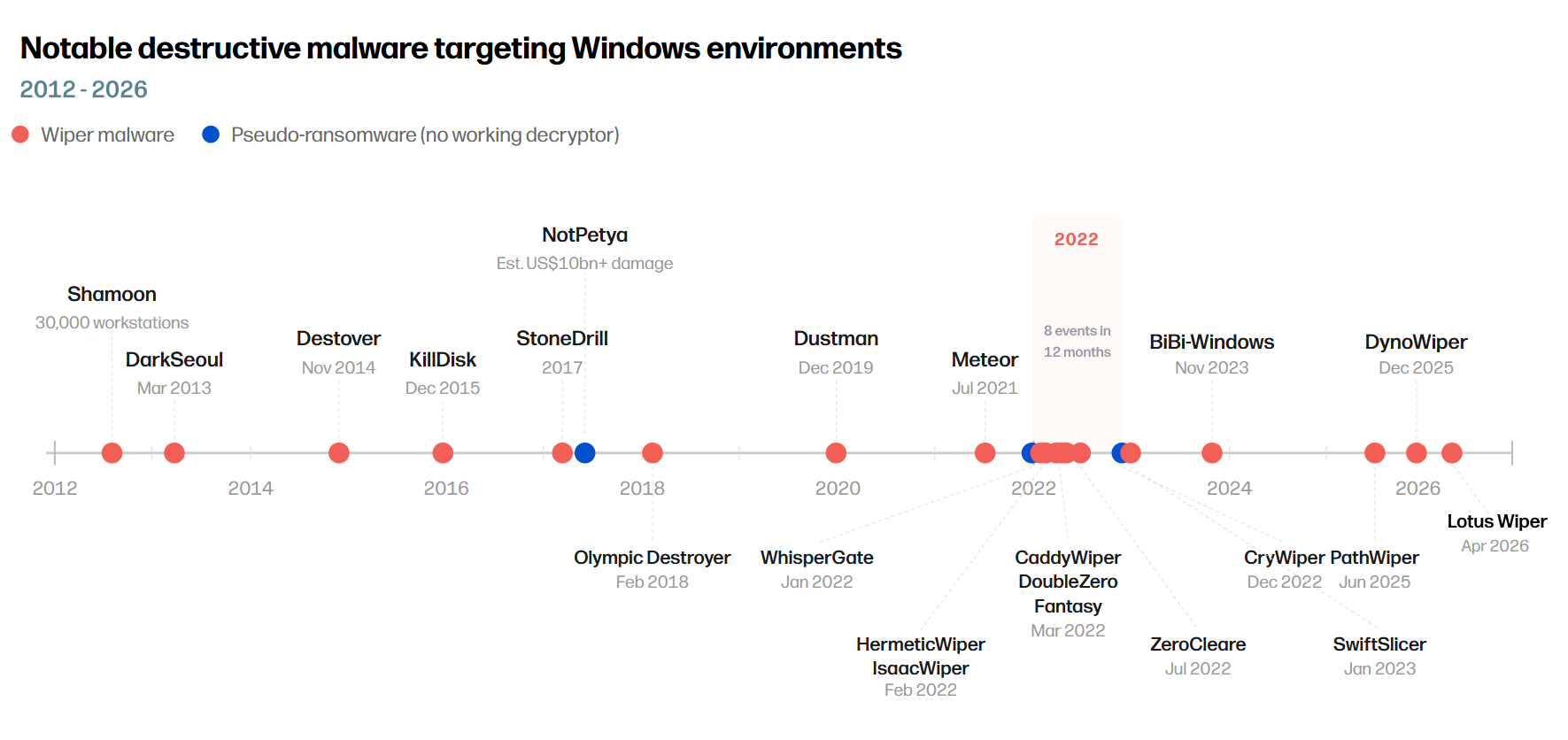
Figure 1 – Notable destructive malware attacks
The infection chain
Destructive attacks do not happen in an instant. They follow a sequence of actions that maps closely to the MITRE ATT&CK framework, the industry-standard model for understanding adversary behavior. For each stage, we describe the attacker’s behavior, what organizations can do to defend themselves, and how HP solutions provide specific capabilities to help businesses be resilient in the face of such attacks.
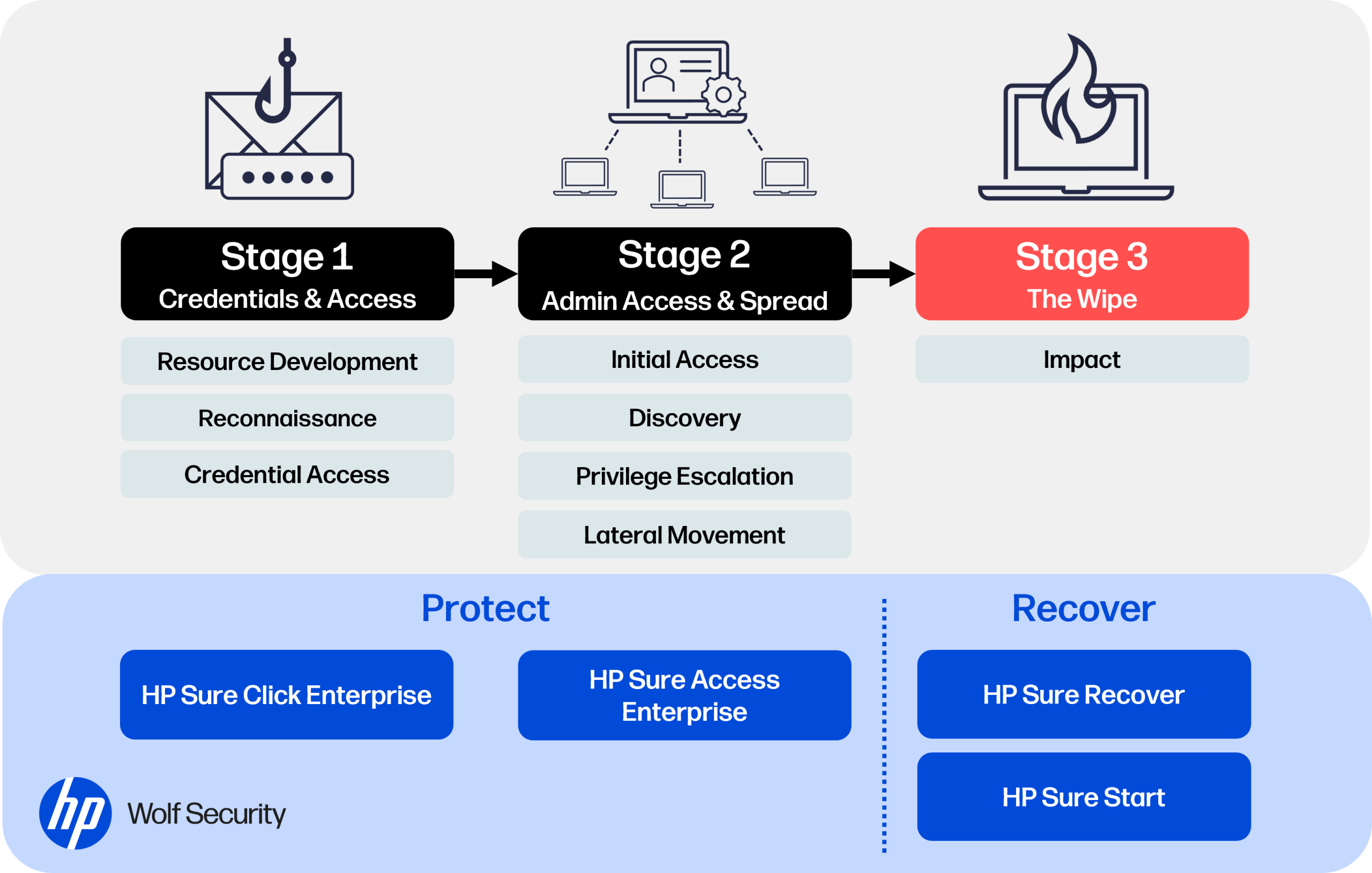
Figure 2 – Stages of a destructive attack mapped to MITRE ATT&CK and HP Wolf Security solutions for resilience
Stage 1: Precursor – reconnaissance and credential theft
What happens
Before an attacker can destroy anything, they need a way in. Increasingly, that access comes through stolen session tokens as well as stolen usernames and passwords.
During reconnaissance, attackers identify high-value access points, such as identity and access platforms like Microsoft Entra ID, device management consoles, VPN gateways, remote access portals, and cloud administration interfaces. Once compromised, these systems can provide access to large fleets of devices. The credentials and tokens harvested during these operations are then traded through a mature ecosystem of underground marketplaces and initial access brokers.
Other attackers use those markets to buy access rather than obtain it themselves. They search for credentials already stolen from the target’s employees, including usernames, passwords, session tokens, and browser cookies harvested by information-stealing malware. Infostealers are commonly delivered through phishing emails, malicious downloads, poisoned search results, or compromised websites. With a valid credential or session token, an attacker has what they need for initial access and can begin preparing a destructive attack.
Supply chain compromise provides another route in, allowing attackers to reach targets indirectly through trusted software, service providers, or management platforms.
How to protect yourself
Enforce phishing-resistant multi-factor authentication (MFA) across all accounts, starting with privileged users and administrators. Monitor threat intelligence sources for exposed credentials and session tokens tied to your organization. Reduce your endpoint attack surface by limiting what untrusted content can access on the host system, including email attachments, downloads, and browser sessions.
Train staff to recognize social engineering, but do not rely on training alone. Assume some malicious content will reach the endpoint and implement controls that contain it when it does.
How HP helps
Many credential-theft attacks begin with a single click, such as opening an email attachment, downloading a file, or visiting a compromised web page. Detection-based defenses catch many of these threats, but not all of them. HP threat research found that in Q1 2026, at least 11% of email-borne threats stopped by HP Wolf Security had bypassed one or more email scanners.
Organizations need controls that prevent interactions with risky content from becoming credential theft. Untrusted files, links, and browser activity should be isolated from the host OS and valuable data, such as stored credentials or session tokens. HP Sure Click Enterprise implements this through hardware-enforced micro-virtual machines, containing malicious content at the point of interaction.
Stage 2: Initial access, lateral movement and preparing for destruction
What happens
Once inside, attackers validate their access and look for ways to expand it. They enumerate users, groups, devices, administrative roles, cloud resources, device management platforms and remote access paths. Their aim is to identify the systems that control the environment at scale.
In destructive attacks, this phase has a distinctive pattern. Attackers often target the organization’s ability to recover before deploying the destructive payload. Backup and recovery systems are an early priority. Device management platforms, hypervisor consoles, cloud administration interfaces, and remote monitoring tools are also high-value targets because they can push changes across infrastructure, disable protections, or prevent recovery.
Inadequate identity verification for password and MFA resets, missing MFA, overprivileged accounts, and poorly restricted administrative sessions can give attackers the access they need to move laterally, prepare a mass wipe, and interfere with recovery.
How to protect yourself
First, understand your administrative attack surface. Identify every administrative console, remote access path and identity system in your environment. These are the assets that need the strongest protection.
Then, apply stronger controls to administrative access. Require phishing-resistant MFA for privileged sessions and restrict where those sessions can originate. Implement robust identity verification for password and MFA resets, especially where support is outsourced. A phone call should never be enough to reset a privileged account.
Protect backup infrastructure, following guidance from technical authorities such as CISA, NIST, ENISA and the UK’s NCSC. Maintain immutable and offline backup copies that cannot be reached through the production network. Monitor for anomalous access, including logins from unusual sources, bulk command activity, policy changes outside maintenance windows, and unexpected access to backup systems. Segment administrative interfaces from the general network and restrict which systems can initiate connections to them.
Test disaster recovery plans through realistic exercises, including scenarios where the attacker has compromised identity systems, device management platforms, or backup infrastructure.
How HP helps
To limit lateral movement, privileged administration should not assume the integrity of the local endpoint. Administrative sessions for backup, hypervisor, cloud, and remote monitoring systems should be isolated so malware on the host cannot access keystrokes, screen content, clipboard data, or session memory. HP Sure Access Enterprise provides a unique protected session model for high-value administrative work. It uses advanced isolation to keep administrative sessions protected even when an endpoint is compromised. This prevents the endpoint from being used as a route into enterprise systems needed to prepare a mass wipe.
Stage 3: Impact – the wipe
What happens
The attacker is now ready to initiate the wipe. Sometimes this arrives as wiper malware that destroys boot-critical data so devices will no longer start. Sometimes it is disguised as ransomware, complete with a note demanding payment, but no working decryptor exists and none was ever intended.
In other cases, the attacker turns the organization’s own management tools against it, issuing mass remote wipes, factory resets, or bulk device deletions across the fleet. At this point, the attacker has achieved their objective of disrupting operations.
How to protect yourself
Recovery speed now matters most. IBM’s 2025 Cost of a Data Breach report found that breaches contained in under 200 days cost an average of US$3.61 million, compared with US$5.49 million for breaches that took longer.
Maintain tested recovery processes that do not depend on infrastructure the attacker may already control. Firmware integrity should also be part of recovery planning, because compromise below the OS can persist across rebuilds and evade OS-level security tools.
How HP helps
The device must be trusted before the OS can be restored with confidence. HP Sure Start protects system firmware by validating firmware integrity at startup and monitoring runtime system management code for tampering while the device is running. If corruption is detected, the hardware can automatically recover from a cryptographically validated firmware image stored securely on the local device.
This matters because a clean OS image is not enough if the firmware beneath it has been tampered with. By verifying and restoring firmware integrity first, HP Sure Start helps ensure that OS recovery starts from a trusted device foundation rather than on top of a compromised system.
HP Sure Recover then restores the endpoint from a trusted source when the local OS can no longer be relied on. It supports automated OS reimaging with hardware-enforced cryptographic validation of the OS image downloaded from a networked resource. With Embedded Reimaging or Enhanced Local Storage, supported devices can also use isolated dedicated local storage, providing a fast local recovery path that does not depend on network access.
After a mass-wipe event, this combination reduces reliance on manual rebuilds and supports faster, trusted recovery across the endpoint fleet.
Resilience against destructive attacks
Destructive attacks require a resilience model designed to limit operational disruption. The priority is to prevent compromise, restrict what a compromised endpoint can reach, and preserve recovery paths that remain trustworthy after destructive payloads are deployed.
HP technologies help make this resilience model practical. Threat containment isolates risky files, links, and websites before they reach the host. Protected access separates administrative sessions from the local endpoint. HP’s certified hardware Endpoint Security Controller will enforce resilient endpoint firmware integrity below the OS, and supports secure OS recovery capabilities to help restore devices and data across the fleet. Implemented together, these controls make destructive attacks much harder to execute and less likely to become a fleet-wide outage of thousands of dark screens and weeks of disruption.
Resources
About the Author

Recent Posts